Download PDF file (multi-language)
List of items
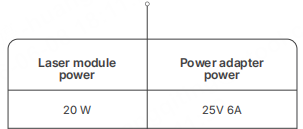
xTool M2 20W Module | Power adapter
| User manual |
Meet xTool M2 20W Module
Warning and instruction signs
Laser specifications
Wavelength | Beam divergence | Maximum power output | |
|---|---|---|---|
Working laser | 445 ± 15 nm | 1.5 mrad (IEC 60825-1 Default (simplified) ) | 24 W |
Working temperature
The 20W module works properly at temperatures from 0°C to 35°C.
Install the laser module (take the 20W module as an example)
· Ensure that xTool M2 is powered off before installing.
· Use the infrared module only with xTool M2. Before use, read and follow Safety Instructions and Quick Start Guide of xTool M2.
(1) When you install the laser module, the two location pins on the back of the laser module and the multi-function module holder should be aligned.
(2) Connect the laser module and the multi-function holder with a module connection cable.
(3) Connect to a power supply and turn on the power switch.
Use xTool M2 20W Module
(1) Go to s.xtool.com/software to get the xTool software.
(2) Connect xTool M2 to your computer.
Note: If you use the adapter, it can only be used to connect to a computer and must not be used to connect to a device.
(3) Follow the instructions in the software to start processing.